Rukhaiyar's Corner

  • Home
  • About
  • Blog
  • General
    • Education
    • Society
    • Economy
    • Politics
    • Defence
    • History
    • IT Sector
  • Internet
    • SEO
    • Domain
    • Hosting
    • Apps
  • Privacy Policy
  • Contact Us
  • Home
  • Contact Us

Easy WordPress-NGINX Configuration – EasyEngine

May 2, 2015 by Abhishek Rukhaiyar Leave a Comment

In this post, I’m going to take you to the world of Lightning Fast WordPress using simple WordPress-NGINX Configuration achieved using a powerful package EasyEngine.

Why WordPress-NGINX?

Apache is the world’s most used web server. So, why to opt for an NGINX based server. I’m going to start with an image which tells you a well-known secret.
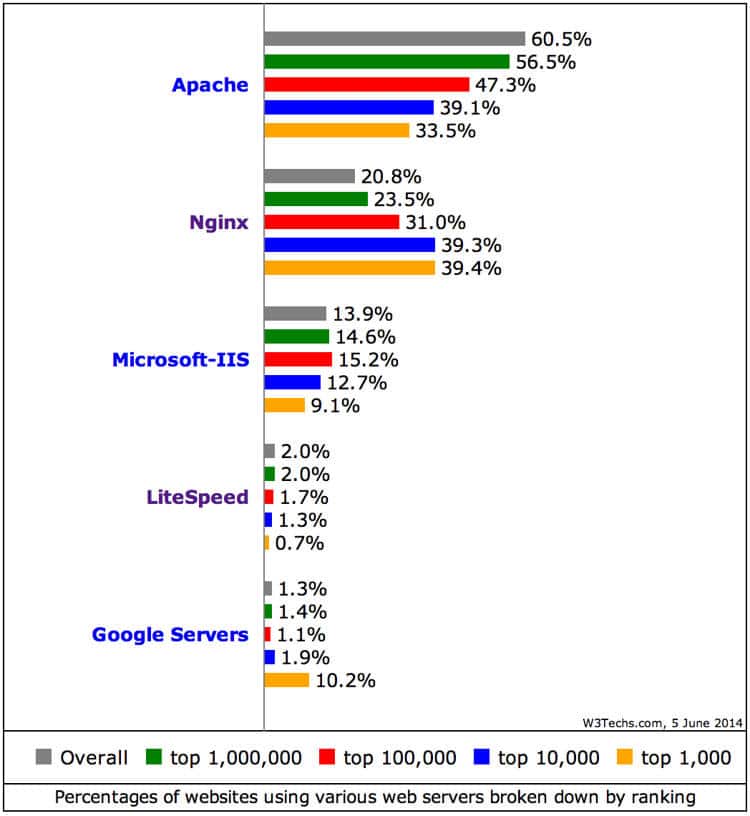
Wordpress-Nginx Configuration

An Eye Opening Analysis – Source: nginx.com

The above analysis tells us the usage percentage of different popular servers in the world based on its usage in all the websites; usage in top 1,000,000; top 100,000; top 10,000 and top 1,000 websites. Apache is overall definitely a very popular web server. But, when it comes to top 10,000 or top 1,000 websites by usage, NGINX surpasses them to be the most widely used web server. It shows that NGINX has definitely an edge over Apache.

Google’s server seems a popular web server in top 1,000. But, it is a costly web server. Further, as it is only popular among top 1,000 websites, it means Google web server is definitely good. But, Google’s Server is not for all. It is a premium service.

One more interesting thing is even WordPress are using nginx for its own servers. You may check it out at the following pages. WordPress.COM and WordPress.ORG.

Nginx Logo

Nginx – High Performance Web Server

Here are some benefits of using nginx in simple language:

  • Nginx is fast because it does not need to create a new process for each new request.
  • Nginx uses very little memory, especially for static Web pages.
  • Nginx can be used with a range of systems.
  • Nginx is highly scalable, and performance is not dependent on hardware.
  • Nginx is easy to install and configure.
  • Nginx has very less CPU load

However, there is an overlooked fact here. Apache is used by a heavy number of top 1,000 websites. So, those websites with best minds on the earth behind them must be getting phenomenal result with Apache too. The thing is Apache needs some tweaking which is not simple to do. Tweaking nginx is easy. Even on low-budget and nil tweaking, nginx gives impressive results.

Why EasyEngine?

Before going into the question, why EasyEngine, I should answer what is EasyEngine.

WordPress-Nginx Configuration - EasyEngine

EasyEngine – Engineered with Simplicity

In 2010, one of my website TheApplePirates.com became a hit within a month of its launch. It was getting more than 10,000 pageviews a day. It was my first website to get such a good response. I had invested in just domain name for this website. Hosting was from a free one. So, it was becoming slow after the traffic crossed 5,000 a day mark. It was the first time that I went first to a VPS Server, then to a dedicated server. Being completely in an unknown arena. At that time, I came to know about some packages like Alternate PHP Caching (APC), Varnish, memcached, eAccelerator and other such names. I researched a lot those days and tried to implement few on my server. It took me more than 3 days to make APC working on my server. I know, I’m not a technical guy with any degree or even diploma in computers. But, spending 3 days to make APC work that too without a splendid performance. Its insane.

Anyways, after the recent success of my websites, once again I was forced to try my luck with memcached and nginx. It was real pain to make all these packages to work together. If you have tried to do the same. I’m sorry for your wastage of time. The answer to all these complex installation could be a very simple to use customized Package EasyEngine.

EasyEngine with not more than 3-4 commands can install a nginx based server with PHP5-FPM, MySQL and added features like FastCGI, memcached, Zend OPcache, Google Pagespeed, Postfix. It is a package made especially for WordPress and its performance optimisation. It gives option for a WordPress website to be created with page caching support using optimal setting for either of FastCGI or WP Total Cache or WP Super Cache and also with no page cache. Further, one can use it for WordPress subdomain or sub-directory installation too. Using EasyEngine on a fresh server, one can install 12 types of WordPress install in less than 5 mins. An interesting feature, it tweaks its configuration itself as per available hardware resources. However, for optimal use, I recommend to tweak the configuration of packages included as per your requirements.

EasyEngine blends compatible and latest packages together to give a stable environment. Regular updates are released which are easy to install with a single command. However, the tweaks and settings remain unchanged after update. I’m using SSD-VPS from Virpus Hosting for this website. At Virpus Hosting, by paying just $ 5 per month one can set up a website using EasyEngine to easily support a WordPress blog to handle daily traffic of 1,000-2,000 that too with a page load time of under a sec. If you are a blogging for long, you must think I’m giving false picture. But, this is true. Using EasyEngine along with few plugins that I’ll tell you in coming posts. You can do it without hassle.

The beauty of EasyEngine lies in its simplicity, flexibility, cost effectiveness and performance. I give 5 out of 5 in all these segment to EasyEngine. There is more alternative to EasyEngine – Like LAMP, WAMP, MAMP, XAMPP. But, all are Apache based packages. I would love to test package similar to EasyEngine for nginx if you can suggest some.

Installation of EasyEngine

Installation of EasyEngine is quite simple and Easy. Get a fresh server. If you want for testing, you can use an instance from Amazon EC2, else for deployment of your WordPress blog get a VPS from Virpus Hosting. EasyEngine currently supports Ubuntu and Debian 6/7. I prefer Ubuntu over Debian due to its wide popularity.

Once you get root access to your server via command line (Putty), the first step should be to update the server to latest using following command. Press y, if it needs permission during update.

apt-get update && apt-get upgrade && apt-get dist-upgrade

Next, run the following command. It will install EasyEngine. During the run, you will be asked to enter your name and email id.

wget -qO ee rt.cx/ee4 && sudo bash ee

Once completed, run the below command. It will install MySQL, NGINX, PHP5-FPM, HHVM along with Opcache, WP-CLI, phpMyAdmin, Adminer and other useful packages. Now, it also supports Docker.

Now, you are all set to install your website. Use the below command to install WordPress.

ee site create www.example.com –type=wp

Replace www.example.com with your own domain name. Copy and save WordPress admin Username and Password from the screen.

Now, just point your domain’s dns to the IP address of your server. Once this is done. You can see your blog right away with easy WordPress-NGINX Configuration.

I suggest using CloudFlare for dns hosting and other optimisation. If you are using CloudFlare, you can change the IP address within few seconds to point to your new server.

I would write in subsequent posts about customisation of EasyEngine. Further, I’ll try to make you familiarise with basic architecture of file system in EasyEngine.

If you liked the post, do give a feedback. I would love to hear your response.

Filed Under: Internet, WordPress Tagged With: EasyEngine, nginx, wordpress nginx configuration

Introduction From Basic: What is WordPress?

September 28, 2014 by Abhishek Rukhaiyar Leave a Comment

Google Blogger

Many of you who are familiar with blogging, when told about blogging the first thing that comes in mind is a blog on Google Blogger. It was a purchased by Google in 2003 started by Pyra Labs. It became the most popular platform for blogging. However, Blogger has some limitations like:

  • You can’t customize much in respect of appearance or features. You have to do a lot of research if you are not a pro.
  • It is hosted and owned by Google. They can shut it down any time. They can act and remove your blog on complain without any warning. Copyright violation, DMCA notice any such notice to Google will result in immediate removal of your blog.
  • The most important of all is Blogger is outdated and not a preferential service of Google. They are not keen in updating the service with latest advancement in blogging and make it more user and customization friendly.

In between a lot of alternative services flourished. WordPress, Drupal, Joomla and others. Google Blogger is used mostly for regular blogging only. However, these services are referred as Content Management Service (CMS). These are used to create a lot many different sort of website than just a blogging website. One may see the current market share of all the Content Management Services CMSs here.

Wordpress Logo

You may see WordPress has developed as a giant for CMS. Drupal and Joomla both give software which could be easily installed on hosting environment to create your website and comes with Open-source License. Hence, one could customize it easily. However, WordPress provides both Google Blogger type blogging platform where you can sign up and start blogging and Open-Source Licensed software which you could install on self-hosting environment like Drupal and Joomla.

WordPress blogging platform is available at www.WordPress.com. It is popularly referred as WordPress.COM. The self-hosted blogging software could be downloaded at www.wordpress.org. This is referred commonly as WordPress.ORG or self-hosted wordpress.

Just like Google Blogger, WordPress.com has some restrictions. However, their blogging environment is much more advanced than Google Blogger. Customization and many add-on services are allowed as premium services on payment. There are almost 60 Million blogs hosted on WordPress.com. If you are a novice and want to create a wonderful looking blog where you can start writing without nothing to worry about, choose WordPress.com.

Wordpress Dashboard

WordPress.ORG gives all the capability of customization and personalization. The customization and personalization could be achieved easily by more than 2,500 free themes and 30,000 free plugins. In order to set up your WordPress.ORG blog, you need to get a hosting account at HostGator, BlueHost, JustHost or other such hosting company. Plus you need your own domain name which you can get at GoDaddy. Most of the hosting company give domain name at the time of registering for their service. But, it’s better that you use your own domain name from GoDaddy. As it will be easy if you wish to change hosting company in future. In later articles I will give your more details about blogging with WordPress. Enjoy!

Filed Under: Blogging, Internet Tagged With: WordPress

How to Make a Facebook Page That Is Successful

May 16, 2013 by Abhishek Rukhaiyar Leave a Comment

The effective and successful use of social media has become one of the main ways for businesses to see success in today’s market. Almost everyone uses some form of social media, the most popular being the website known as Facebook. This social website allows users around the world to connect with one another through messages, photos, and games. Facebook also allows for businesses to advertise to anyone in the world while effectively connecting with their customers. While a Facebook page is easy to make, it is hard to make it successful and something that attracts a great deal of customers. There are a variety of different tips on how to make a Facebook page that is successful, though here are a few of the simple ones that can help you to gain a much larger number of customers.

Content

Before your Facebook page can be successful, it needs to be filled with interesting and useful content. People who visit your Facebook page will want to see pictures, informational posts, and other things that can attract their attention. Thus, when creating a Facebook page, treat it like you are creating a new website. You will want to make sure that you have a stylish theme that goes along with the general idea of your business. Next, you will want to make sure that your banner and profile picture are interesting and reflect well on the work that you do. Once you have these main things, you are going to want to begin posting on your page and putting pictures up. While you can put huge amounts of information on your page all at once, it is more effective to slowly upload information. This will make it so your customers are constantly coming back to your Facebook page to see new content

Getting Views

You will want to attract as many people as possible to your Facebook page, though this does not mean that you should invite everyone that you can find. Be selective with whom you first invite to see your page. As you slowly begin to invite more people and businesses, more people will begin to come to your site from these other pages. If this method does not work quickly enough for you, there is also the option of putting up advertisements through Facebook, though this can sometimes be expensive.

Monitoring

While it probably isn’t healthy to be constantly checking your Facebook page all day, the best trick on how to make a Facebook page that is successful is to quickly respond to anyone that posts on your page. Whether a person messages you or simply leaves a comment on your page, you should try to respond to these people as soon as possible, even if it’s just a few words. By doing this, you will gain a greater amount of trust and respect from your customers and they will be more willing to buy your product or service. They will also be more likely to refer you to their friends and acquaintances, helping to generate even more customers for your business.

Filed Under: Internet Tagged With: Advertising, Facebook, Social media, Social network

Tips on How to Get on Google Places

April 23, 2013 by Abhishek Rukhaiyar Leave a Comment

You may notice when you get on Google and type in a business, the first results you’ll see are for local companies. For instance, if you are in Phoenix, Arizona and you want to find a local hardware store, the listings at the top of the page will include a few stores in the area along with the address and contact info. If you’re a business looking to get ahead, you can be among these local listings. To accomplish this goal, learn how to get on Google Places.

Creating and Using an Account

Google Places is a part of Google that allows you to enter in your business on the web. Your business listing will be easily found through google.com and Google Maps. To get started, enter in the URL http://www.google.com/places. When it pulls up, you’ll be asked a few questions about your business so just enter this info in before proceeding. You’ll be able to edit this information later. If your business appears to be on the same street as another business, Google may ask you if the listing already exists. You should click either “Add Listing” or “Claim Listing.” Then you’ll be asked to input all the extra details about your business. You can upload videos, photos, and logos as well as enter in payment methods and hours. Hit “Submit” when you’re satisfied with what you’ve entered. Your next step will be to verify the listing you have created. You can verify via phone or mail. Phone is the recommended strategy since it’s faster and mail means waiting two to three weeks to receive verification. Once you’ve picked your method, click “Finish.” If you chose to verify by phone, a green box will appear that informs you Google is calling you. Don’t miss this brief but important call. Google is calling you to give you a pin number you will need to enter in to proceed. If you miss the phone call, you’ll have to contact Google again since it will likely not call you up again. Type in your pin in the field under “Your Businesses.” You should be finished at this point. Expect to see a confirmation page from Google and see your listing online in about a week.

Other Helpful Tidbits

Now that you have your account set up, you still may have a few remaining questions. For one, you may be concerned about how to optimize your listing so more Googlers will see it. You gain more viewers by adding as much info as possible to the listing. Include photos, business hours, a website link, and a description of your establishment. Your listing will be matched to more searches this way. You’ll also get better business if customers know they can go online to get directions, coupons, updates, and customer reviews. Fortunately, Google adds more information to your listing found from other website and online directories so some effort on your part is spared. To get more out of Google’s services, you can invest in AdWords, Google Earth, Street View, Panoramio, Google Analytics, and other Google apps. Now you should understand all the steps for knowing how to get on Google Places.

Filed Under: General, Internet, SEO Tagged With: Business, Google Place

How To Get The Best Out Of Content Writers To Make Your Website Engaging

March 25, 2013 by Abhishek Rukhaiyar Leave a Comment

Developing web content is completely different from general writing techniques, or writing for the print media. The job requires specific linguistic skills and expertise, and a basic awareness of the important SEO considerations. If you wish to reach out to all your targeted potential clients over the web, smart and engaging content can be one of your best allies, along with user-friendly website design schemes. How can you get the best from the content writers in your business? Let’s take a look:

Freelance-Writer-1024x743

Train and motivate

Once you have a team of content writers, make sure that they are provided with adequate training. This is particularly important if the majority of them are fresher. Provide them with in-depth insights about the different types of content that are written for the web, like article submissions, guest blog posts, press releases and website content. Smart techniques to search for information online is also something the writers should be made aware of.

Give them a clear idea of what is required from them

Does your client require American English for his/her project, while your content developers are used to writing in British English? Stay away from such probable mismatches, and inform the writers about all the project details, before they start working on them. Just like revisions in website development techniques, re-writing the same pieces of content can be problematic!

Ask them to work in collaboration with the SEO managers/marketing team

Content writers should always be encouraged to interact with the SEO managers and marketers within the company. Ask the managers to provide clearly defined topic themes to the writers, along with the desired word counts, and the keywords to be targeted. If a specific promotional tone is required in the content, inform the writers about the same from beforehand.

Encourage content writers to be creative

Just like your web design & development plans, content writing can also be really catchy and creative. Remember that, unless people find the content on your pages interesting, they will simply flip over to a competitor’s website. Make sure that the creative streak in the style of writing of the content developers is never lost. The content should have the ideal combination of information-richness and imaginativeness. Everyone has information – your website should have it presented in the best way!

Formatting is important

Your CMS website design services might be top-notch, but the bounce rates might still remain high – simply because the content writers are coming up with large chunks of (albeit informative) content. Help them understand the significance of creating properly formatted, scannable text content. The content writers should be using header tags, bullet points and lists, to neatly segregate the different sections of the web content. Learn more about content formatting tips here.

Give them achievable targets

Content writers are supposed to be creative, have a large vocabulary, and quick enough as well. Do not stress too much on the last quality, however, which can compromise the qualitative aspect of the web content. Provide them with rational, achievable targets, and make the writers a part of this decision-making process. If the writers are not pressurized, they will definitely deliver better.

Payments

Even the most dedicated worker can lose his/her enthusiasm in the absence of adequate compensation – and content writers are no exception either. Determine the compensation package of the writers, according to their skill levels and years of experience. Financial motivation can spur on the content writers to operate at their most efficient levels.

Content writers are vital cogs in the overall online operations of your business. Prepare a team of qualified and creative content writers, who would be able to develop web content of all types. When your website design is nice, and the content is fresh, informative and interesting – your business will definitely find greater recognition.

Filed Under: Blogging, Internet, SEO Tagged With: Search engine optimization, Web content, Writer

Blogging for Business

January 23, 2013 by Abhishek Rukhaiyar Leave a Comment

Internet and business go hand in hand. If you are thinking of marketing your business, you have to consider the Internet as a platform to ensure it has the maximum effect and reach. Internet is not only an effective platform, but also the cheapest. You may have to spend a little or no money at all when you choose Internet marketing.

From being one of the most expensive departments, advertising has become cost-effective. There are different types of online marketing techniques. You have social media, online videos, banner ads, digital ads, etc. Another popular type of marketing is through blogging. If used correctly, blogging can be used as a powerful tool to market. Here are a few effective tips.

Blogging for Business: Give blogging your personal touch

It is always effective when you add a personal touch. Even if you don’t get the time to blog on a daily basis, you can have a personal space on the blogging website. Little bits and pieces, like writing about how the company developed, the initiative taken will give people an idea on how a successful company is being run. This will not only earn you loyal followers, but people will also start reading the other blog posts. When the CEO of the company is directly involved, there are a lot of chances for the company’s name to grow in the social media sphere.

Blogging for Business: Be a pro at what you convey

It is important to position yourself as an expert. When people are trying to find out more details on a particular product or service, they are looking for more information than only about their design. When you post content, ensure that it has some depth and are informative. Writing blogs to improve search engine optimization can prove to be disastrous after a point. Don’t get too much into optimization and forget about your company’s reputation. When the content you post is vague and not comprehensive, the number of your readers  will decrease slowly.

Blogging for Business: Post content consistently

Post articles on a regular basis. It would be good if you could post a couple of articles on a daily basis. Make sure you are consistent with your posting. If you don’t have something new for the readers, they might forget that the company is present in the blogging network. Don’t just post a monologue. Try engaging the reader by prompting them to give their feedback on the particular post.

Blogging for Business: Link the content to your website

Blogging provides an excellent platform to channelize the readers to the company’s website. Create keywords in each article and ensure it is linked to your website. Not just to your website, you can also prompt the readers to go ahead and connect with you across various internet platforms including social media. There are so many social networking plug-ins available on all the blogging platforms that you can use. For example, ‘Like’ for Facebook, ‘Follow’ on Twitter, ‘+’ to join Google Plus, ‘Pin It’ for Pinterest, etc. This way, you get to popularize your business web page available across other platforms.

Effective blogging is all about keeping your readers and followers engaged and at the same time making sure you promote the business. The trick lies on how well you balance both. These are a few effective tips you can try. Just remember that your company’s reputation is at stake and so is your marketing plan when taking the blogging platform.

Filed Under: Blogging, Economy Tagged With: Blog, Business, Search engine optimization, Social media

  • 1
  • 2
  • Next Page »

Recent Posts

  • Easy WordPress-NGINX Configuration – EasyEngine
  • Examination – Has It Killed Education?
  • Organic Foods: Are They Worth The Hype
  • Introduction From Basic: What is WordPress?
  • How Good Are The New IITs

Recent Comments

  • Abhishek Rukhaiyar on JEE: Should I Take A Drop?
  • kiara on JEE: Should I Take A Drop?
  • nobin on When Should I Start Preparing for IIT?
  • nobin on When Should I Start Preparing for IIT?
  • Abhishek Rukhaiyar on IIT JEE: What should be the strategy for repeaters?

Design

With an emphasis on typography, white space, and mobile-optimized design, your website will look absolutely breathtaking.

Learn more about design.

Copyright © 2026 · Sixteen Nine Pro Theme on Genesis Framework · WordPress · Log in